
Sneltoetsen
Werken met sneltoetsen is veel handiger werken dan met de muis. Je gebruikt de muis niet en hoeft deze dus ook niet continu te positioneren (een ingewikkeld oog-hand coordinatie spelletje). Ook blijven je handen op hun plaats; let eens op hoe vaak je nu wisselt tussen muis en toetsenbord. Constant! Met sneltoetsen ontwikkel je je motorisch geheugen, zoals je ook pincodes onthoudt: binnen afzienbare bedient je programma’s blindelings!
Om te helpen sneltoetsen te onthouden hebben we een slim overzicht gemaakt voor Sneltoetsen Mac NL 1.3 en Sneltoetsen Windows NL 1.3 wat in drieeën gevouwen precies onder je toetsenbord past.
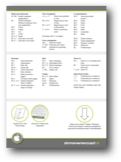
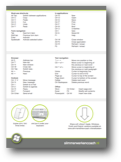
Kick-ass smarter working keyboard shortcuts cheatsheet
Back in the day it was all about keyboard shortcuts. Then the computer mouse came along and made us all lazy. No more remembering keycombos, just point ‘n click. This hand-eye coordination game was fun for a while, but as we try to actually work efficiently a lot of us are finding out keyboard shortcuts are a lot more effective. But how to learn them all?
Well you don’t need to learn them all, please don’t. We selected only the best keyboard shortcuts to help you work more efficiently. We actually gave it some thought, decided it was best to print it (duplex!), fold it in three and keep it under your keyboard. Start using the keyboard shortcuts above the first fold, when you master those, go on to the next.
You work on a laptop and don’t have a separate keyboard? That’ll be the first working smarter tip; buy an external keyboard. It’s well worth it.
Of course we really don’t know all the shortcuts and you’re bound to know more than we do. Please share your ultimate keyboardcombos and help us improve this selection!
The cheatsheets are available for Mac OS X and Windows. We don’t discriminate. They’re also available in Dutch, but since you’re reading this we’re guessing you’d prefer
Social comments and analytics for this post…
This post was mentioned on Twitter by clemenselia: RT @resourcerer: Best erg handig voor Mac-gebruikers, @hermankopinga en @drbakker lijstje met sneltoetsen: http://bit.ly/macsneltoetsen…
[…] een tijdje als vanzelf, je hoeft er nauwelijks meer aan te denken. Om je alvast te helpen beginnen, hier een mooi […]
[…] spiekbriefjes zijn beschikbaar voor Mac OS X en Windows. We discrimineren niet. Ze zijn ook in het Engels beschikbaar, mocht jij de taal van je computer op […]
[…] Lifehacking.nl maakte een mooi overzicht van de meest frequent gebruikte sneltoetsen voor de Mac en voor Windows PC. Check ze op de sneltoetsen-pagina en download ze als pdf. […]
[…] slimmerwerkencoach.nl kwam ik deze sheet tegen met alle shortcuts. […]
[…] Sneltoetsen « Slimmer werken coach Werken met sneltoetsen is veel handiger werken dan met de muis. Je gebruikt de muis niet en hoeft deze dus ook niet continu te positioneren (een ingewikkeld oog-hand coordinatie spelletje). Ook blijven je handen op hun plaats; let eens op hoe vaak je nu wisselt tussen muis en toetsenbord. Constant! Met sneltoetsen ontwikkel je je motorisch geheugen, zoals je ook pincodes onthoudt: binnen afzienbare bedient je programma’s blindelings! (tags: lifehacks shortcuts) […]
[…] spiekbriefjes zijn beschikbaar voor Mac OS X en Windows. We discrimineren niet. Ze zijn ook in hetEngels beschikbaar, mocht jij de taal van je computer op […]
[…] spiekbriefjes zijn beschikbaar voor Mac OS X en Windows. We discrimineren niet. Ze zijn ook in hetEngels beschikbaar, mocht jij de taal van je computer op […]
[…] kunt een overzicht van sneltoetsen downloaden (PDF) bij de Slimmerwerkencoach. Print het document, vouw het, leg het onder uw toetsenbord en u […]
[…] deze pagina van Slimmerwerkencoach.nl is een selectie gemaakt van de beste sneltoetsen voor slimmer werken. […]
[…] in je systeem te krijgen. Om het aanleren van sneltoetsen te vereenvoudigen hebben ze bij slimmerwerkencoach.nl een zeer handig spiekbriefje ontwikkeld voor onder je toetsenbord. Wie de smaak echt te pakken […]
[…] spiekbriefjes zijn beschikbaar voor Mac OS X en Windows. We discrimineren niet. Ze zijn ook in het Engels beschikbaar, mocht jij de taal van je computer op […]
[…] gezegd. Alt en 5 maakt het euro-teken Er zijn nog veel meer sneltoetsen. Bij deze superhandige lijst staat voor zowel Apple-Mac computers als voor Windows-computers een link naar een superhandig […]